AI Screen Audit is a privacy-oriented, LLM-powered intelligent monitoring feature exclusive to PrivateDLP Pro. It enables administrators to define workplace behaviors and security risks via plain language, automatically analyzes periodic terminal screenshots to classify working, leisure and offline time, and triggers real-time email alerts for abnormal or data-risk behaviors. All regular analysis screenshots are instantly deleted after AI recognition to protect employee privacy, while violation records are retained for audit. The feature works out-of-the-box with Google Gemini and supports customizable integration with third-party or on-premises LLMs, effectively compensating for traditional rule-based DLP limitations and improving enterprise productivity supervision and data leakage prevention.
1. Introduction
Different from rigid rule-based monitoring systems that can only identify preset risky behaviors, PrivateDLP AI Screen Audit leverages LLM visual analysis capability to recognize complex and unknown employee behaviors. It effectively covers atypical data exfiltration scenarios such as uploading confidential files to unknown cloud disks, sending corporate data via personal email, and browsing job-hunting websites, making up for the blind spots of traditional DLP security governance.
2. Core Feature Highlights
2.1 Natural Language Custom Behavior Recognition
Administrators can define employee non-work behaviors and risky audit behaviors through simple natural language descriptions, without complex code or fixed rule configuration. The system supports independent rule setting for single Windows devices and batch unified configuration for multiple terminal devices, realizing refined and flexible terminal behavior auditing.
2.2 AI-Powered Working & Leisure Time Statistics
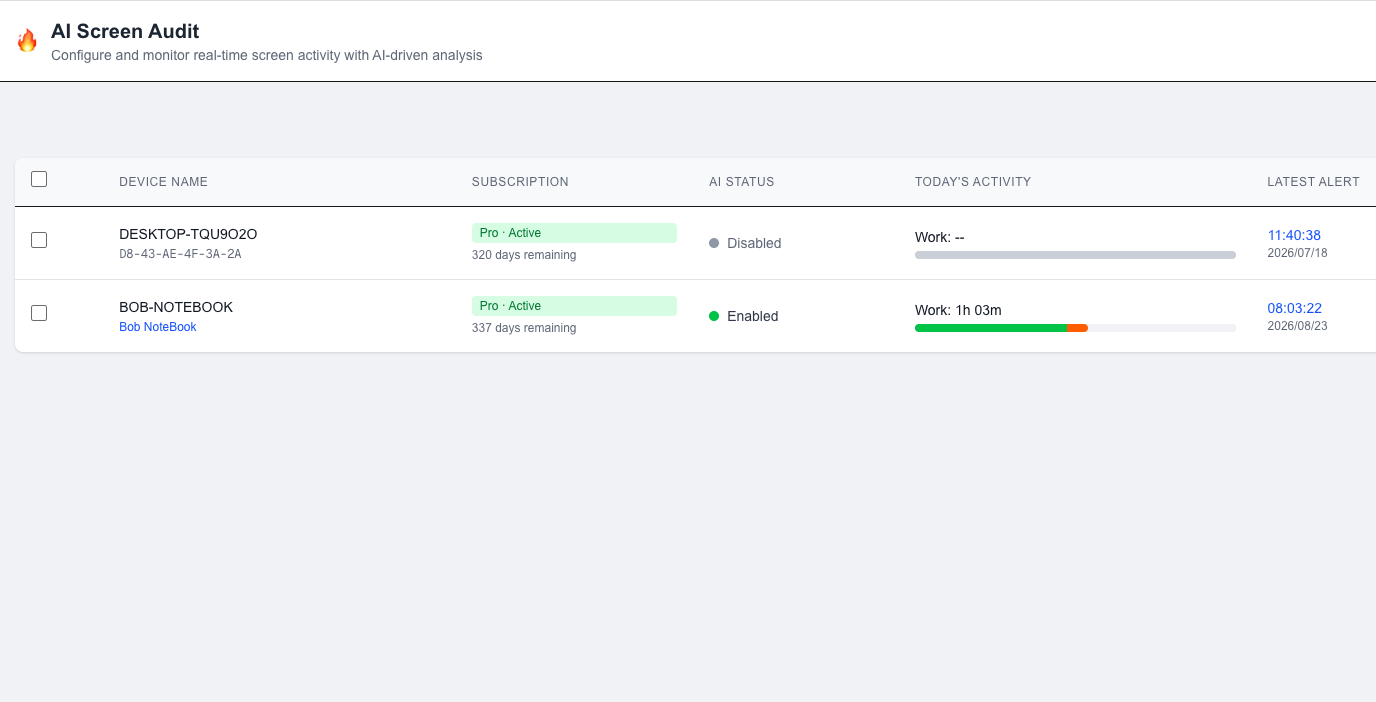
The system automatically captures terminal screen screenshots at an interval of approximately 1 minute, invokes the LLM model for intelligent analysis, and accurately classifies terminal status into three dimensions: Working Time, Leisure Time, and Offline Time. It generates multi-month continuous statistical reports to help enterprises visualize employee work efficiency and terminal activity status.
2.3 Intelligent Security Alert Mechanism
Administrators can customize risk alert rules in natural language for various data leakage and abnormal office behaviors. Once the system detects violations, it will automatically retain evidence screenshots and push real-time email notifications to administrators for timely risk disposal.
2.4 Privacy-First Secure Architecture
Adopting a zero-privacy-risk design: all screenshots used for AI analysis are permanently deleted immediately after model identification. Only screenshots of confirmed violation behaviors are retained as audit evidence. The default integrated Gemini API will never use enterprise screenshot data for model training, fully complying with enterprise data privacy and compliance requirements.
2.5 Flexible AI Model Adaptation
The out-of-the-box version supports rapid deployment based on Google Gemini API. For enterprise customized scenarios, it supports docking with mainstream public cloud LLMs (OpenAI, Claude) and private self-deployed LLM models, realizing full local storage and analysis of enterprise data to meet high-level data security and privatization deployment needs.
3. Prerequisites
Before enabling the AI Screen Audit function, confirm the following environment and version requirements:
Software Version: PrivateDLP Edition (USB Disk Security Standard Edition does not support this function)
Client System: Windows operating system (full compatibility with mainstream Windows 10/11 and Windows Server versions)
Network Condition: The terminal can access the public network (required for default Gemini API analysis; offline private LLM deployment is exempt)
Account Permission: Web management backend administrator permission (with strategy configuration and device management authority)
4. Quick Start (3-Step Deployment)
Step 1: Enable AI Screen Audit Function
Log in to the PrivateDLP web management backend, enter the terminal device list page, select a single device or check multiple devices in batches, turn on the AI Screen Audit master switch, and confirm the strategy is issued and synchronized to the Windows client. The client will automatically start the background screenshot capture and intelligent analysis service without affecting normal terminal operation.
Step 2: Customize Audit Rules in Natural Language
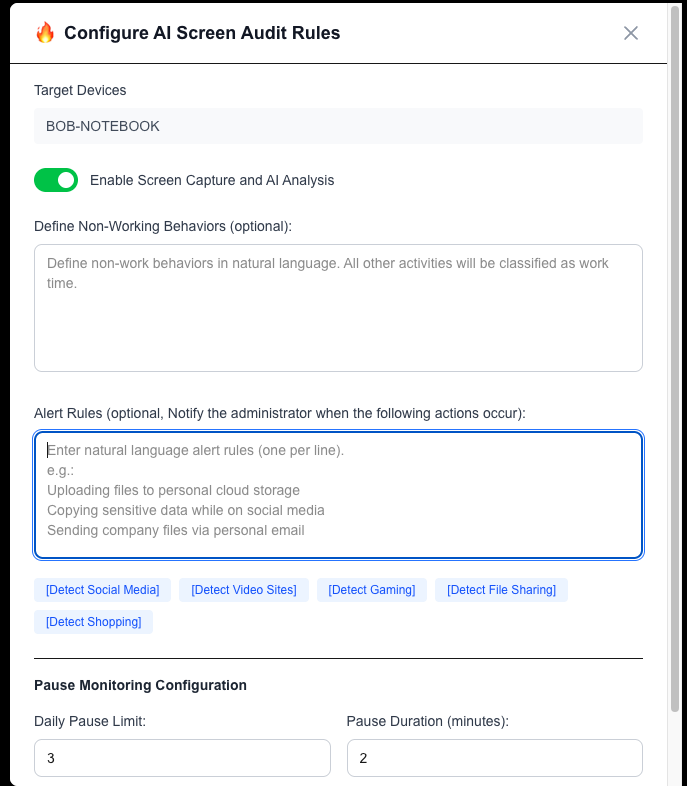
Enter the AI rule configuration interface, and complete two core rule settings according to enterprise management requirements:
Leisure Behavior Definition: Describe non-working behaviors in natural language (e.g., browsing video websites, running game software, shopping online, browsing social media). The system defaults all undefined behaviors to working behaviors.
Risk Alert Definition: Customize violation behaviors that require alerting (e.g., uploading corporate confidential files to personal cloud disk, sending business data via personal email, browsing recruitment websites, copying core data to USB flash drives). Set email notification recipients for violation alerts.
After configuration, submit the rules, and the strategy will take effect on the target terminal within 1 minute.
Step 3: View AI Audit Statistical Data
After the function is enabled, the system will automatically accumulate terminal behavior data. Enter the AI Audit Data Dashboard to view real-time and historical statistical results, including daily working time proportion, leisure time proportion, offline duration, and detailed violation alert records. Support multi-month data query and trend analysis to realize long-term employee efficiency management and internal risk monitoring.
5. Core Function & Data Description
5.1 Time Dimension Statistics Indicators
Working Time: Terminal running business software, viewing work documents, operating office systems and other defined work-related behaviors
Leisure Time: All behaviors defined by administrators as non-working activities
Offline Time: Terminal shutdown, screen lock, sleep, network disconnection and other inactive states
5.2 Alert Trigger Logic
When the LLM model identifies that the terminal screen behavior matches the customized risk rule, the system will automatically capture and store the violation screenshot, generate a detailed alert log (including device number, violation time, behavior description, screenshot evidence), and push an alert email to the administrator in real time.
6. Privacy & Security Specification
Real-time analysis screenshots are automatically deleted immediately after LLM identification, with no local or cloud residual files;
Only violation alert screenshots are retained as audit evidence, supporting customized storage to enterprise designated S3-compatible storage or exclusive secure storage;
Default Gemini API does not collect or train enterprise user screen data, ensuring enterprise data sovereignty and privacy security;
All audit data transmission is encrypted, and only authorized administrators have viewing and management permissions.
7. Advanced Custom Instructions
The out-of-the-box version is based on Gemini API for one-click use. For enterprises requiring private API key access (OpenAI/Claude) or on-premises LLM deployment to realize full internal data isolation, please contact us for customized development and docking services. The customized private LLM solution supports 100% retention of enterprise data in the internal network, meeting strict internal control and compliance requirements.