This guide focuses on the rule configuration operations of PrivateDLP AI Screen Audit, including natural-language-based work/leisure behavior definition and customized security alert rules. It covers single-device and batch deployment procedures, rule effective logic, and alert triggering mechanisms. The flexible natural language rule system overcomes the limitations of traditional fixed-pattern DLP policies, allowing enterprises to adaptively identify unknown office risks and precisely classify employee working and leisure status. All non-violation screen data is automatically deleted after AI analysis to ensure employee privacy while maintaining effective internal security supervision.
1. Overview
AI Audit Rule Configuration is the core management module of PrivateDLP Pro AI Screen Audit function. Different from traditional monitoring software that relies on fixed keyword, process or URL blacklist rules, PrivateDLP allows administrators to define audit standards and risk behaviors through free natural language description.
The system intelligently understands enterprise management policies via LLM, realizes flexible identification of complex office behaviors, and supports independent configuration for single terminal and batch configuration for device groups. This document standardizes the whole process of rule creation, deployment, testing and daily management for enterprise administrators.
2. Pre-configuration Notes
Version Requirement: Only available for PrivateDLP Edition; Standard USB Disk Security does not support this function.
Permission Requirement: Web backend administrator access with strategy configuration and device management privileges.
Effective Mechanism: New or modified rules will be synchronized to Windows client and take effect within 1 minute.
Default Logic: All behaviors not defined as leisure behavior are automatically classified as working behaviors.
3. Rule Configuration Entry
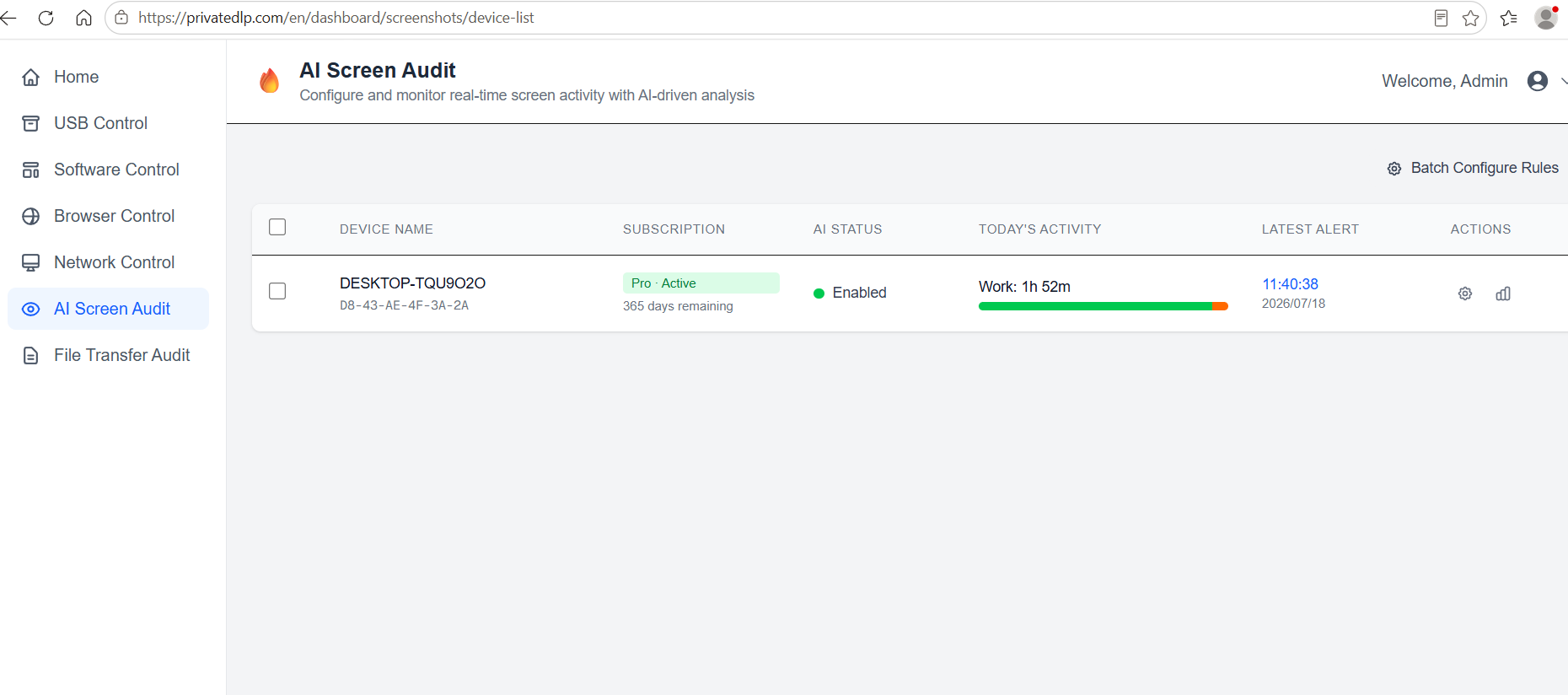
Log in to the PrivateDLP web management platform, enter the terminal device list page. The system provides two configuration modes for different O&M scenarios:
Single Device Configuration: Suitable for differentiated management of individual employee terminals; click the device detail button to enter the independent AI rule editing page.
Batch Device Configuration: Suitable for unified team or department management; check multiple online devices in batches and submit unified rules for one-click deployment.
4. Working & Leisure Time Rule Configuration
4.1 Rule Definition Logic
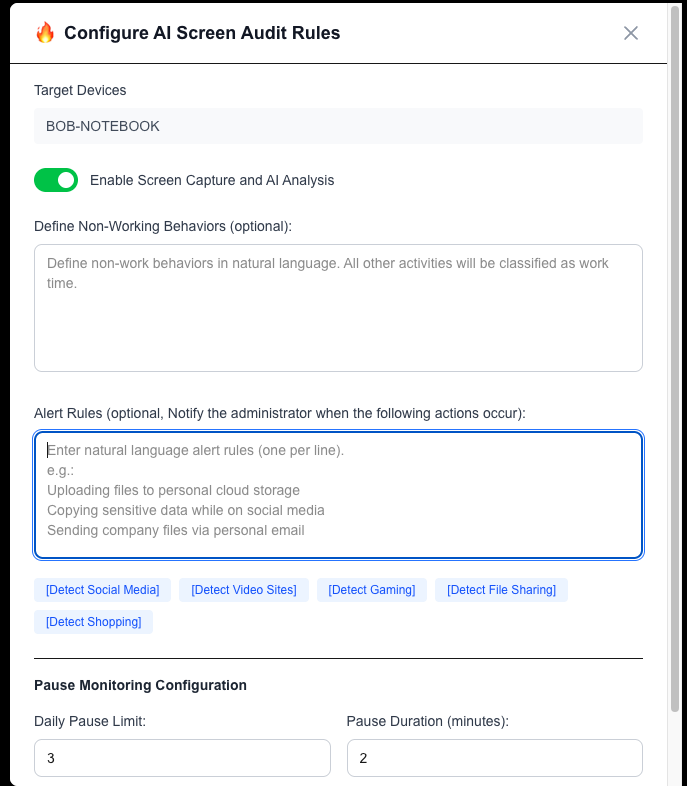
Administrators only need to describe non-working leisure and non-work behaviors in natural language. The LLM will automatically identify and mark corresponding screen behaviors as leisure time, while all other office operations are counted as valid working time.
4.2 Standard Configuration Examples
Enterprise administrators can refer to the following common rule templates to customize content:
Browse video websites, short video platforms and non-work platforms during working hours
Run game clients, mini-games and non-work software
Browse shopping websites, social media and forum platforms
Watch live streams, listen to music and conduct non-work non-work activities
4.3 Configuration Suggestions
Use concise and clear descriptive sentences, avoid ambiguous or overly abstract descriptions.
Differentiate rules according to department attributes (e.g., allow media department to browse video platforms, while prohibiting administrative departments).
Do not repeat overlapping behaviors to avoid repeated statistical judgment by the model.
5. Security Alert Rule Configuration
The natural language alert rule is used to define enterprise prohibited risky behaviors. Once the AI screen audit matches the violation behavior, the system will retain screenshots, generate audit logs and push email alerts to administrators.
5.1 Applicable Risk Scenarios
This rule makes up for the blind spots of traditional DLP rigid rules, covering unknown and flexible data leakage behaviors, including but not limited to:
Uploading company confidential documents, customer data and business files to personal cloud disks, unknown network disks and personal network storage
Sending core business data and internal files through personal email, social software and external channels
Browsing job hunting websites, resignation consulting and competitor platform websites during working hours
Attempting to copy a large number of enterprise files to USB removable devices
Screen recording or photographing internal confidential system interfaces
5.2 Alert Notification Setting
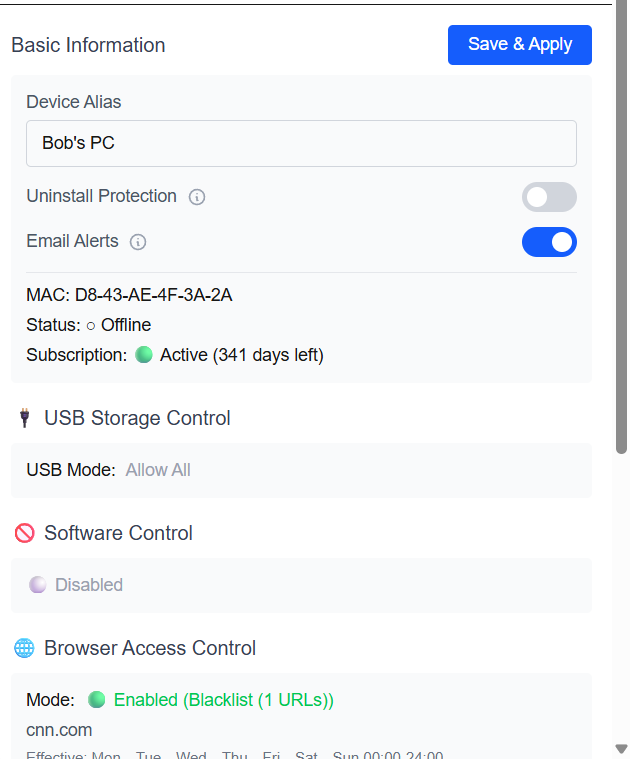
On the home page, you can open the email notification alert information. The system will automatically push alarm messages with violation time, target device, behavior description and evidence screenshots when risks are triggered, supporting real-time risk disposal.
6. Rule Deployment & Effective Verification
6.1 Deployment Steps
After editing the leisure behavior rules and risk alert rules, click Submit. The web platform will automatically issue the policy to the selected Windows terminals. The client will update the rule set in real time without restarting the device or program.
6.2 Effective Verification Method
Check the device status in the backend device list; the AI audit status changes to Running.
Simulate partial leisure behaviors, and check whether the daily terminal time statistics are updated normally.
Simulate defined risky operations, and verify whether the system generates alert records and email notifications.
7. Rule Management & Optimization
7.1 Rule Modification & Update
Administrators can edit and update rules at any time according to enterprise management changes. Modified rules will overwrite the old policies and take effect within 1 minute synchronously.
7.2 False Positive & False Negative Optimization
If normal work behaviors are misjudged as leisure behaviors or individual risky behaviors are not identified, optimize the natural language description: refine behavior keywords, supplement scene restrictions, and improve model recognition accuracy.
8. Privacy & Rule Security Mechanism
All screenshots for daily AI behavior analysis will be permanently deleted immediately after recognition, with no residual data.
Only screenshots matching risk alert rules will be retained as audit evidence for traceability.
Rule content is stored in encrypted form, and only authorized administrators have modification and viewing permissions.
Default Gemini analysis data will not be used for model training to ensure enterprise data privacy and sovereignty.
9. Advanced Customization Instructions
The standard natural language rule function is available out-of-the-box based on Gemini API. For enterprises that need to access private LLM API keys (OpenAI, Claude) or deploy privatized LLM models locally, please contact our technical team for customized docking. The privatized solution supports full internal network analysis of terminal screenshots, realizing zero external data transmission and meeting high-standard enterprise compliance requirements.